Inspection FAQs
Follow the instructions below to view an application in the CitizenServe Portal and verify whether a permit has been issued and is active:
- Login to the CitizenServe Portal at www.BaldwinCountyAL.gov/CSP.
- Select “View My Requests”.
- From the drop-down list, choose “View My Bldg Dept”.
- If the permit is not immediately visible, select the "All" tab and change the drop-down date range filter to "All".
- Click the permit number.
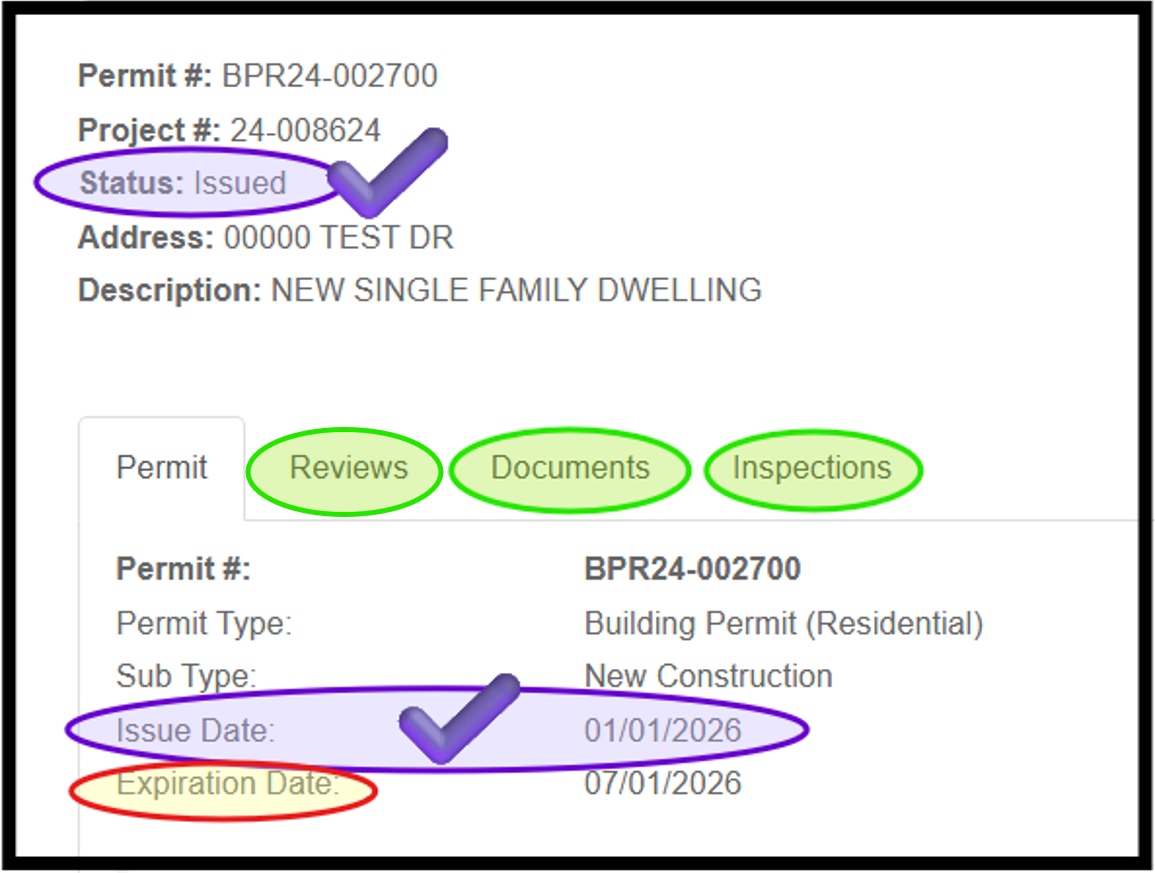
Next, review the Status, Issue Date, and Expiration Date fields. An application is not considered a valid permit until all required fees are paid and an issue date has been posted. A subsequent status change, such as “Cancelled” or “Expired,” or the passing of the expiration date may invalidate the permit, even if an issue date appears.
Below is a sample view of a permit in the portal.
Note: Additional tabs are available to view Reviews, Documents, and Inspections.
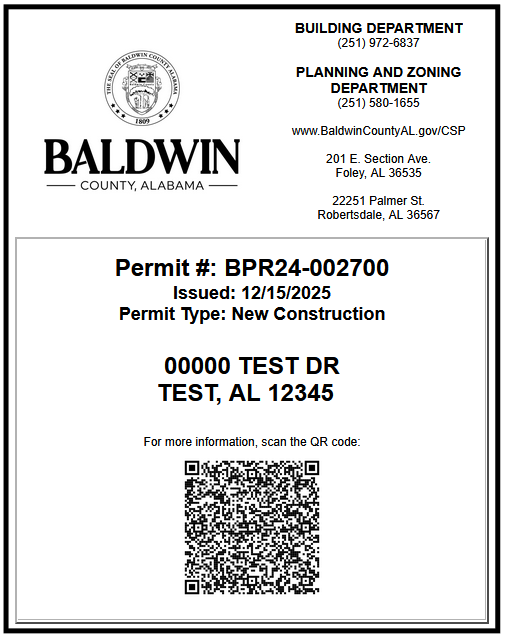
For smaller projects, such as trade permits (mechanical, electrical, and plumbing), accessory structures, additions, alterations or repairs, or swimming pools, the permit may be printed and placed inside a window facing the street or driveway.
This permit document (as shown in the sample below) is typically emailed to the applicant after the permit is issued and is also available through the CitizenServe Portal. Instructions for accessing documents in the portal are provided in the next section below.
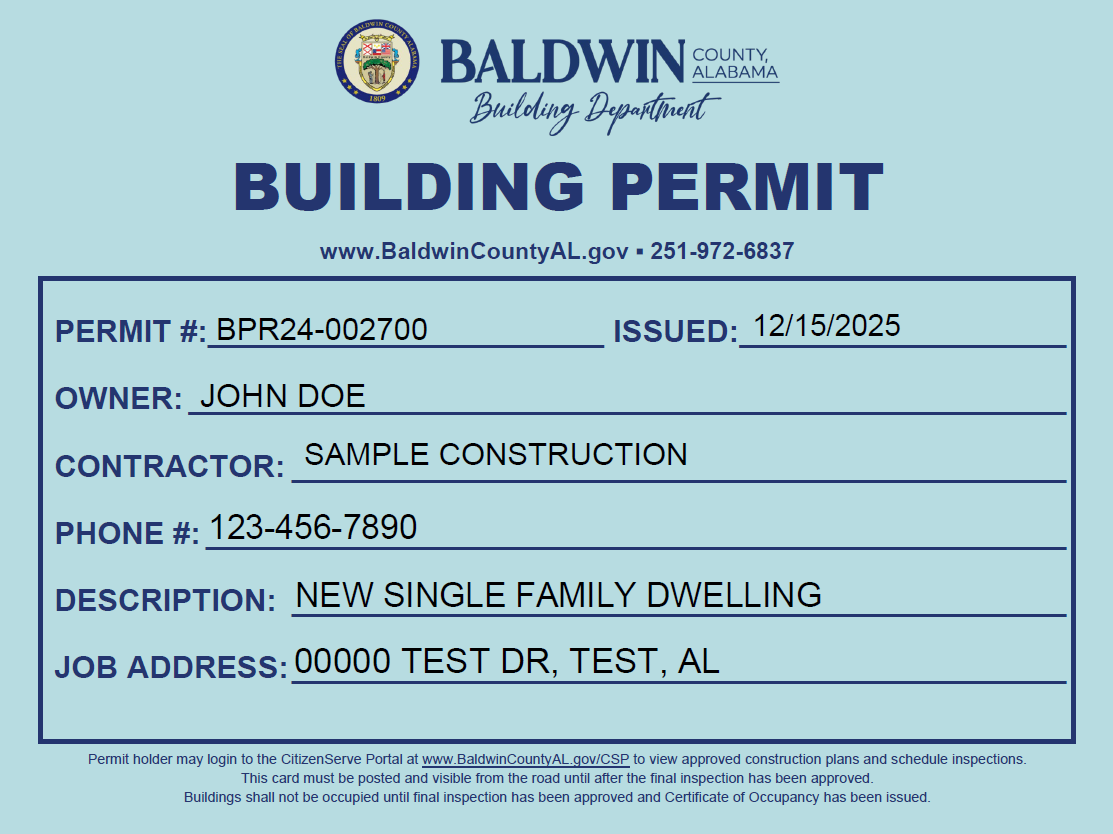
For larger projects, or for projects where a building does not currently exist, a permit card (as shown in the sample below) may be picked up at any Permitting Office.
To access plans approved for construction and to view other documents in the portal:
- Login to the CitizenServe Portal at www.BaldwinCountyAL.gov/CSP.
- Select “View My Requests”.
- From the drop-down list, choose “View My Bldg Dept”.
- If the permit is not immediately visible in the list, select the "All" tab and change the drop-down date range filter to "All".
- Click the permit number.
- Select the "Documents" tab.
- Locate the document type labeled "PLANS / APPROVED FOR CONSTRUCTION" and click the file name.
- The approved plans will download to your device and may then be viewed or printed.
Additional documents related to the permit will also be available in the Documents tab.
Note: Review the Building Codes section of the website to access all adopted building codes, amendments, and modifications.
A Building Permit authorizes construction only for the single structure listed in the work description and shown on the approved plans. Separate permits must be obtained from the Building Department before adding any additional structures or starting any other work, including but not limited to the following:
- Mechanical / HVAC work
- Electrical work
- Plumbing work
- Decks or porches not included on the approved construction plans
- Swimming pools
- Retaining walls
- Manufactured home installation
- Accessory buildings such as carports, storage sheds, pole barns, workshops, etc.
- Build-outs or conversion of an existing structure into a residence or habitable dwelling
- Marine accessories such as boathouses, piers, docks, etc. located in a Special Flood Hazard Area
- Dune walkovers located in a Special Flood Hazard Area
- Signs and billboards
- Re-roofing (replacement of existing roof)
Note: A Building Permit for a Manufactured Home Installation does require a separate Electrical Trade Permit; however, Trade Permits for Mechanical/HVAC and Plumbing are not required.
Review the Permit FAQs section of the website for additional information.
Before beginning any work, complete the following:
- Review all comments listed on the Final Plan Review Report emailed to the applicant after the permit was approved for payment.
- Use only the plans labeled Plans Approved for Construction that are stamped by Baldwin County. Review the approved plans carefully for any notes or comments. Instructions for accessing the approved plans are provided in one of the sections above.
- Post the permit document or permit card in a location visible from the public road. The permit card must remain posted onsite until the final inspection has been approved.
Note: For Gulf-front properties located in Fort Morgan, two permit cards are required - one should be posted on the beach side and one posted on the street side. - Provide adequate sanitary facilities for workers.
- Ensure proper trash containment is in place.
Site inspections are conducted by Inspectors with the Baldwin County Planning and Zoning Department. For questions regarding site inspections, the Baldwin County Planning and Zoning Department may be contacted at 251-580-1655 or by email to Planning@BaldwinCountyAL.gov.
- Site - Site/BMP – At this inspection, the inspector verifies that required Best Management Practices (BMPs), such as silt fencing and other erosion and sediment controls, are properly installed; that site grading and drainage flow are correctly established; and that the structure is located within all required setbacks.
Schedule this inspection after form boards are set and the full building footprint is staked, but before installing pilings or pouring concrete. Any work started before this inspection is approved is done at the permit holder’s and property owner’s risk. The permit holder and property owner are responsible for ensuring the structure is built within the required setbacks and that BMPs remain in place and functional throughout the entire construction process.
If construction occurs outside the required setbacks, the property owner and permit holder are responsible and liable for all corrective actions. Corrections may include relocation, reconstruction, or any other work needed to bring the project into compliance. All associated costs are the responsibility of the property owner and/or permit holder. - Site - Final – This inspection is required near the end of the project and must be approved before a Certificate of Occupancy can be issued and/or the permit file can be closed. At this inspection, the inspector verifies that the completed project complies with the Zoning Ordinance, Subdivision Regulations, approved site plans, and with all setback, drainage, and stormwater requirements.
These type inspections (except for the site inspections) are conducted by Inspectors with the Baldwin County Building Department. Not every inspection listed below will apply to every project. The inspections required will depend on the specific type of construction and scope of work covered by the permit. Contact an inspector to verify which inspections are necessary based on the permitted project.
- Site - Site/BMP – Refer to the Site Inspection section above for details.
- Electrical - Temp Power Pole – This inspection may be scheduled once the temporary power pole has been installed and all electrical components are in place. It must be scheduled before the meter is installed.
- Foundation - Pilings/Post Holes – Post hole spacing, depth, diameter, and rebar placement is inspected before any concrete is poured.
- Foundation - Footing – This inspection is performed after all reinforcement is installed and properly supported.
- Foundation - Block Fill (CMU/ICF) – This inspection is required only if foundation will be over three (3) blocks high; and it is required before the CMU/ICF wall pour to confirm reinforcement is in place.
- Plumbing - Open Trench (rough-in) – The underground piping with water head on the system is inspected.
- Foundation - Slab Ready to Pour Concrete – Vapor barrier and slab reinforcement is inspected. Compaction Tests or an Under Construction Elevation Certificate may be required at the inspector’s discretion.
- Building - Strapping (exterior only) – This inspection is required only if exterior strapping will be covered before the 4-Way Inspection.
- Building - Sheathing* – This inspection can be performed if sheathing will be covered before the 4-Way Inspection.
- Building - Water Resistant Barrier* – This inspection is required only if exterior wall covering will be installed before the 4-Way Inspection.
- Building - Brick Tie* – This inspection is required only if exterior brick veneer will be installed before the 4-Way Inspection.
- Building - Above Porch Ceiling – This inspection is required only when porch ceilings will be installed prior to the 4-Way Inspection. All framing, strapping, and electrical components that will be concealed by the porch ceilings must be completed before this inspection.
- 4-Way – This inspection includes framing, mechanical, electrical, and plumbing inspections and, if applicable, gas and fire sprinkler system inspections. All required Trade Permits must be issued before any work begins. The following must be completed prior to scheduling this inspection:
- Framing – All required components must be installed, including rough framing. Truss details must be provided if applicable. Strapping, sheathing, vapor barriers, brick ties, windows, flashing, exterior doors, fire blocking, bracing, and thermal barriers must be in place.
- Mechanical – All required components must be installed. Supply, return, makeup air, and exhaust ductwork must be properly supported and sealed with code-compliant sealant. The air handler, if applicable, must be installed. All attic-installed mechanical equipment requires a minimum 30-inch work platform, a minimum 24-inch walkway for access, and all electrical components. Condensate and drain lines must also be installed.
- Electrical – All required components must be installed, including wiring, strapping, and nail guards where applicable. Switches, receptacles, and smoke alarm junction boxes must be in place. All sub-panels, main feeders, and dedicated circuits must be fully installed.
- Plumbing – All required components must be installed and pressurized. Drain, waste, and vent (DWV) piping must be installed, properly supported, and full of water to five (5) feet above highest fixture, with nail guards installed where required. Water closet flanges, washer boxes, ice maker boxes, and shower or tub units must be installed.
- Gas – All required components must be installed. Gas lines must be pressurized, properly labeled, and adequately supported.
Note: Contact the gas utility provider to verify whether they require additional inspections. - Fire Sprinkler System – All components must be installed, pressurized, supported, and ready at the time of the 4-Way.
Commonly Missed Items at 4-Way Inspections:
- Install blocking at all fascia and soffit splices.
- Window fall protection is required by final inspection when the top of the sill is 24 inches or less above the finished floor and 72 inches or more above the finished grade or other surface below on the exterior of the building.
- Fill drain piping with water.
- Test pressure is required on PEX piping.
- Test pressure is required on gas piping.
- Install hangers or a ledger at the top of stair stringers.
- Anchor bolts are required within 12 inches of plate breaks, on both sides.
- Fresh air is required for each air handler.
- Install an air barrier behind tubs at attic walls and exterior walls, unless spray foam insulation is used in those locations.
- Install fireblocking in all concealed spaces, as required.
- Building - Energy/Insulation – At this inspection, insulation and air barriers must be installed. All wall and ceiling boxes, windows, and door openings must be sealed. If spray foam insulation is used and the attic will be accessed for mechanical equipment or storage, an evaluation service (ES) report is required to verify ignition barrier requirements and compliance.
Note: Blown-in or batted insulation for attics will be verified at the final inspection. - Building - Fire Rated Construction – Fire Rated Construction must be inspected prior to ceiling installation and before mud and tape are applied. Each layer of drywall or sheetrock must be verified before being covered to confirm it matches the approved and listed wall assembly for the project. All penetrations in fire-rated construction must be properly protected to meet applicable code and/or design professional requirements.
- Site - Final – Refer to the Site Inspection section above for details.
- Building - Final – All components must be complete.
Commonly Missed Items at Final Inspections:
- Site - Final Inspection must be approved.
- Address numbers must be installed.
- Glazing protection must be on site and fasteners installed (if applicable).
- All exterior siding must be painted where required.
- Handrails and guardrails must be installed.
- Garage-to-house entry door must be self-closing.
- Electrical panels must be labeled.
- Surged protectors installed per 2024 code.
- Fresh air must be filtered.
- Water heater must be in full working order.
- Backflow prevention devices must be installed.
Common Documents Required Prior to Scheduling a Residential Final Inspection (if applicable to the project):
- Insulation Certificate
- Duct Pressure Test
- Blower Door Test
- Proof of Termite Treatment
- Finished Construction Elevation Certificate (for projects within a Flood Zone/Special Flood Hazard Area)
- US Fish and Wildlife final inspection results (for projects within the Alabama Beach Mouse Habitat area)
- State Elevator Inspection (for projects that include elevator installations)
- State Fire Marshal/Local Fire Department/Approved Third Party Inspector Approval (for projects that include fire sprinkler systems)
* Some inspections may be performed virtually (at the inspector’s discretion) using photos uploaded into the portal.
These type inspections (except for the site inspections) are conducted by Inspectors with the Baldwin County Building Department. Not every inspection listed below will apply to every project. The inspections required will depend on the specific type of construction and scope of work covered by the permit. Contact an inspector to verify which inspections are necessary based on the permitted project.
- Site - Site/BMP – Refer to the Site Inspection section above for details.
- Electrical - Temp Power Pole – This inspection may be scheduled once the temporary power pole has been installed and all electrical components are in place. It must be scheduled before the meter is installed.
- Foundation - Pilings/Post Holes – Post hole spacing, depth, diameter, and rebar placement is inspected before any concrete is poured.
- Foundation - Footing – This inspection is performed after all reinforcement is installed and properly supported.
- Foundation - Block Fill (CMU/ICF) – This inspection is required only if foundation will be over three (3) blocks high; and it is required before the CMU/ICF wall pour to confirm reinforcement is in place.
- Plumbing - Open Trench (rough-in) – The underground piping with water head on the system is inspected.
- Foundation - Slab Ready to Pour Concrete – Vapor barrier and slab reinforcement is inspected. Compaction Tests or an Under Construction Elevation Certificate may be required at the inspector’s discretion.
- Building - Strapping (exterior only) – This inspection is required only if exterior strapping will be covered before the 4-Way Inspection.
- Building - Sheathing* – This inspection can be performed if sheathing will be covered before the 4-Way Inspection.
- Building - Water Resistant Barrier* – This inspection is required only if exterior wall covering will be installed before the 4-Way Inspection.
- Building - Brick Tie* – This inspection is required only if exterior brick veneer will be installed before the 4-Way Inspection.
- Building - Above Porch Ceiling – This inspection is required only when porch ceilings will be installed prior to the 4-Way Inspection. All framing, strapping, and electrical components that will be concealed by the porch ceilings must be completed before this inspection.
- 4-Way – This inspection includes framing, mechanical, electrical, and plumbing inspections and, if applicable, gas and fire sprinkler system inspections. All required Trade Permits must be issued before any work begins. The following must be completed prior to scheduling this inspection:
- Framing – All required components must be installed, including rough framing. Truss details must be provided if applicable. Strapping, sheathing, vapor barriers, brick ties, windows, flashing, exterior doors, fire blocking, bracing, and thermal barriers must be in place.
- Mechanical – All required components must be installed. Supply, return, makeup air, and exhaust ductwork must be properly supported and sealed with code-compliant sealant. The air handler, if applicable, must be installed. All attic-installed mechanical equipment requires a minimum 30-inch work platform, a minimum 24-inch walkway for access, and all electrical components. Condensate and drain lines must also be installed.
- Electrical – All required components must be installed, including wiring, strapping, and nail guards where applicable. Switches, receptacles, and smoke alarm junction boxes must be in place. All sub-panels, main feeders, and dedicated circuits must be fully installed.
- Plumbing – All required components must be installed and pressurized. Drain, waste, and vent (DWV) piping must be installed, properly supported, and full of water to five (5) feet above highest fixture, with nail guards installed where required. Water closet flanges, washer boxes, ice maker boxes, and shower or tub units must be installed.
- Gas – All required components must be installed. Gas lines must be pressurized, properly labeled, and adequately supported.
Note: Contact the gas utility provider to verify whether they require additional inspections. - Fire Sprinkler System – All components must be installed, pressurized, supported, and ready at the time of the 4-Way.
NOTE: For commercial projects, a separate inspection with an approved third-party inspector, the local fire department, or the State Fire Marshal’s Office is required before 4-Way approval.
Commonly Missed Items at 4-Way Inspections:
- Install blocking at all fascia and soffit splices.
- Window fall protection is required by final inspection when the top of the sill is 24 inches or less above the finished floor and 72 inches or more above the finished grade or other surface below on the exterior of the building.
- Fill drain piping with water.
- Test pressure is required on PEX piping.
- Test pressure is required on gas piping.
- Install hangers or a ledger at the top of stair stringers.
- Anchor bolts are required within 12 inches of plate breaks, on both sides.
- Fresh air is required for each air handler.
- Install an air barrier behind tubs at attic walls and exterior walls, unless spray foam insulation is used in those locations.
- Install fireblocking in all concealed spaces, as required.
- Mechanical - Smoke/Fire Dampers – Access must be provided, and all components must be installed in accordance with the approved and listed assembly.
- Building - Above Ceiling –This inspection must be scheduled before installation of a grid ceiling or hard lid. All electrical, mechanical, plumbing, and fire sprinkler components that will be concealed must be fully installed prior to the inspection.
- Building - Energy/Insulation – At this inspection, insulation and air barriers must be installed. All wall and ceiling boxes, windows, and door openings must be sealed. If spray foam insulation is used and the attic will be accessed for mechanical equipment or storage, an evaluation service (ES) report is required to verify ignition barrier requirements and compliance.
Note: Blown-in or batted insulation for attics will be verified at the final inspection. - Building - Fire Rated Construction – Fire Rated Construction must be inspected prior to ceiling installation and before mud and tape are applied. Each layer of drywall or sheetrock must be verified before being covered to confirm it matches the approved and listed wall assembly for the project. All penetrations in fire-rated construction must be properly protected to meet applicable code and/or design professional requirements.
- Site - Final – Refer to the Site Inspection section above for details.
- Building - Final – All components must be complete.
Commonly Missed Items at Final Inspections:
- Site - Final Inspection must be approved.
- Address numbers must be installed.
- Glazing protection must be on site and fasteners installed (if applicable).
- All exterior siding must be painted where required.
- Handrails and guardrails must be installed.
- Garage-to-house entry door must be self-closing.
- Electrical panels must be labeled.
- Surged protectors installed per 2024 code.
- Fresh air must be filtered.
- Water heater must be in full working order.
- Backflow prevention devices must be installed.
Common Documents Required Prior to Scheduling a Commercial Final Inspection (if applicable to the project):
- Insulation Certificate
- Duct Pressure Test
- Blower Door Test
- Proof of Termite Treatment
- Finished Construction Elevation Certificate (for projects within a Flood Zone/Special Flood Hazard Area)
- US Fish and Wildlife final inspection results (for projects within the Alabama Beach Mouse Habitat area)
- State Elevator Inspection (for projects that include elevator installations)
- State Fire Marshal/Local Fire Department/Approved Third Party Inspector Approval (for projects that include fire sprinkler systems)
- Health Department Approval
- Special Inspection Approvals
- Letter of Substantial Completion
* Some inspections may be performed virtually (at the inspector’s discretion) using photos uploaded into the portal.
Inspections are required for all permitted projects in Baldwin County.
Every permit requires at least an approved final inspection. Smaller, single-trade projects (such as electrical upgrades or mechanical/HVAC change-outs) require only a final inspection when the work is complete. Larger projects (such as new construction, additions, and alterations/repairs) require multiple inspections at different stages of construction.
Note: It is the permit holder's responsibility to schedule all required inspections.
MANUFACTURED/MOBILE HOME INSTALLATIONS
- Foundation Inspection – This inspection is required only for projects within a Flood Zone/Special Flood Hazard Area.
NOTE: An Under Construction Elevation Certificate may be required prior to approval of this inspection. - Site - Site/BMP/Residential – Refer to the Site Inspection section above for details.
- Site - Final/Residential – Refer to the Site Inspection section above for details.
- Manufactured Home - Final – This inspection is required after the manufactured home has been installed and tied down, but before skirting is installed. During this inspection, the inspector will verify the following:
- Tie-downs are installed.
- Service connections (including electrical, sewer, and water) are in place.
- Proper egress steps or stairs are installed with required landings, handrails, and guardrails.
- All egress doors must have a minimum thirty-six (36) inch landing, with stairs that are not attached to the unit, and must meet all applicable requirements of the adopted International Residential Code (IRC).
- The AMHC Installation Certification Decal must be affixed to the unit, include the installer number, and be signed and dated by the certified installer.
- A Finished Construction Elevation Certificate must be provided and approved prior to the final inspection.
Note: This document is required only if installed within a Flood Zone/Special Flood Hazard Area.
PARK MODEL INSTALLATIONS
- Site - Site/BMP/Residential – Refer to the Site Inspection section above for details.
- Site - Final/Residential – Refer to the Site Inspection section above for details.
- Park Model - Final – This inspection is required once the park model installation is complete.
DEMOLITION
- Demolition - Final – This inspection is required once demolition has been completed and all debris has been removed from the site.
SWIMMING POOLS/SPAS
- Electrical - Swimming Pool Bonding – This inspection is required for pool walls and decks. All equipment and devices must be GFCI protected.
NOTE: For commercial pools, a copy of the Health Department Approval must be provided before the final inspection can be approved.
RE-ROOFING
- Building - Re-Roof* – A final inspection is required. Photos must be taken throughout the roofing process. Virtual inspections are encouraged. Click here for additional requirements and details on required photos.
ELECTRICAL TRADE PERMITS
- Electrical - Temp Power Pole – This inspection may be scheduled once the temporary power pole has been installed and all electrical components are in place. It must be scheduled before the meter is installed.
- Electrical - Rough-In – For new residential construction and additions, this inspection is completed as part of the 4-Way inspection and does not need to be scheduled separately. For other project types, this inspection may be scheduled once all electrical components have been completed.
- Electrical - Final – For new residential construction and additions, this inspection is completed as part of the Building – Final inspection and does not need to be scheduled separately. For other project types, this inspection may be scheduled once all electrical components have been completed.
MECHANICAL TRADE PERMITS
- Mechanical - Change-Out* – A final inspection is required. Gas units require an on-site, in-person inspection. Virtual inspections are encouraged for electric units. Photos must be taken throughout the change-out process. Click here for additional details on required photos.
- Mechanical - Rough-In – For new residential construction and additions, this inspection is completed as part of the 4-Way inspection and does not need to be scheduled separately. For other project types, this inspection may be scheduled once all mechanical components have been completed.
PLUMBING TRADE PERMITS
- Plumbing - Rough-In – For new residential construction and additions, this inspection is completed as part of the 4-Way inspection and does not need to be scheduled separately. For other project types, this inspection may be scheduled once all plumbing components have been completed.
- Plumbing - Final – For new residential construction and additions, this inspection is completed as part of the Building – Final inspection and does not need to be scheduled separately. For other project types, this inspection may be scheduled once all plumbing components have been completed.
- Plumbing - Final – Also for Water Heater Change-Outs* – Gas units require an on-site, in-person inspection. Virtual inspections are encouraged for electric units.
CELL TOWERS
- Cell Tower - Co-Locate/Final – All work must be completed and ready for inspection. PMI report or detailed photos of all equipment is required prior to inspection.
- Cell Tower - Slab – All reinforcement for cell tower foundation is in place and ready for inspection.
- Cell Tower - Final – All work must be completed and ready for inspection. Provide approval from engineer of record on all structural components.
* Some inspections may be performed virtually (at the inspector’s discretion) using photos uploaded into the portal.
General inspection information:
- It is the permit holder's responsibility to schedule all required inspections.
- If a contractor schedules an inspection, the contractor must notify the homeowner or tenant of the scheduled inspection date so they are aware an inspector will be visiting the property.
- Same-day inspections are not available. Inspections must be requested at least one day in advance.
- AM and PM time windows may be requested but are not guaranteed.
- Building Department inspections are typically performed during the following days and hours:
- Mondays through Thursdays: 7:00 AM to 4:30 PM
- Fridays: 8:00 AM to 12:00 PM
- Ensure all required permits are issued before requesting an inspection. For example, if a 4-Way Inspection is requested and a required trade permit has not been issued, the inspection request may be cancelled.
- Do not cover mechanical, electrical, plumbing, gas, fire sprinkler, etc until all required inspections have been approved.
- Once the inspection is completed, the permit holder will receive an inspection report by email with the results. Inspection reports are also available in the CitizenServe Portal.
- Re-inspection fees:
- $50 (1st occurrence)
- $100 (2nd occurrence)
- $150 (3rd and each additional occurrence)
- Inspections are performed to verify compliance with the minimum standards of the applicable adopted building codes, amendments, and modifications. Adopted codes are available on the Building Department website.
- Baldwin County does not provide verification that construction will qualify for any certification programs. Any inspections required for certification programs must be completed by third-party inspectors in accordance with the program's certification requirements.
To schedule an inspection:
- Login to the CitizenServe Portal at www.BaldwinCountyAL.gov/CSP.
- Select “View My Requests”.
- From the drop-down list, choose “View My Bldg Dept”.
- If the permit is not immediately visible in the list, select the "All" tab and change the drop-down date range filter to "All".
- Click the permit number.
- Click “Request an Inspection”.
- Select the inspection type, the desired date, and enter any notes for the inspector.
- Click "Submit".
- You should receive a pop up confirmation that states: "Your inspection has been requested."
You may also call 251-972-6837 during regular business hours to speak with a Permit Specialist and schedule an inspection. Inspection requests are not accepted via voicemail or email.
To submit or upload documents for an inspector to review:
- Login to the CitizenServe Portal at www.BaldwinCountyAL.gov/CSP.
- Select “View My Requests”.
- From the drop-down list, choose “View My Bldg Dept”.
- If the permit is not immediately visible in the list, select the "All" tab and change the drop-down date range filter to "All".
- Click the permit number.
- Click "Upload Documents".
- Click "Select Files".
- Locate and highlight the file or files to upload, then click "Open".
- Enter notes in the Description field.
- Click "Submit".
Documents uploaded through the portal are automatically assigned to the staff member responsible for the permit file.
You may also visit one of the Permitting Offices to provide hard copies of documents requested by an inspector.
To contact an inspector:
- Login to the CitizenServe Portal at www.BaldwinCountyAL.gov/CSP.
- Select “View My Requests”.
- From the drop-down list, choose “View My Bldg Dept”.
- If the permit is not immediately visible in the list, select the "All" tab and change the drop-down date range filter to "All".
- Click the permit number.
- Click "Leave Message".
- Enter your message and click "Submit".
Messages sent through the portal are automatically assigned to the staff member who is responsible for the permit file.
You may also call 251-972-6837 to reach the Building Department and request to speak with a Building Inspector. Please note that inspectors are typically in the field for most of the day. You may need to leave a voicemail; however, your call will be returned as soon as possible and no later than within 24 hours, except when calls are received before a weekend or holiday.
In accordance with the adopted International Building Code (IBC), a permit becomes invalid if work does not begin on the authorized site within 180 days of issuance or if work is suspended or abandoned for 180 days after it has started. Similarly, the adopted International Residential Code (IRC) states that a permit is considered invalid if work has not started on the authorized site within 180 days of issuance, or if more than 180 days pass between inspections. Each time an inspection is performed, the permit expiration date resets and a new 180-day period begins.
Below are options available to keep the permit active or to close the file:
- If progress has been made on the project since the last inspection (or since the permit was issued if no inspections have been performed), an inspection must be performed before the permit expires. If the project is not yet ready for the next required inspection, schedule a “Progress Inspection” to be performed within two weeks before the expiration date:
- Login to the CitizenServe Portal at www.BaldwinCountyAL.gov/CSP.
- Select “View My Requests”.
- From the drop-down list, choose “View My Bldg Dept”.
- If the permit is not immediately visible in the list, select the "All" tab and change the drop-down date range filter to "All".
- Click the permit number.
- Click “Request an Inspection”.
- Select the next required inspection or select "Building - Progress (Within 2 Weeks Before Permit Expiration)".
- For a Progress inspection, you will be asked to provide a description of any work completed since the last inspection. You may also attach photos to document any progress made since that inspection.
- Select the desired date and enter any notes for the inspector.
- Click "Submit".
- You should receive a pop up confirmation that states: "Your inspection has been requested."
You may also visit one of the Permitting Offices or call 251-972-6837 during regular business hours to speak with a Permit Specialist to schedule an inspection. Inspection requests are not accepted via voicemail or email.
- If progress has not been made on the project since the last inspection (or since the permit was issued if no inspections have been performed), submit a Permit Extension Request before the permit expires.
- Login to the CitizenServe Portal at www.BaldwinCountyAL.gov/CSP.
- Select "Apply for a Building Department Permit".
- Select application type "Permit Revision, Extension, or Reactivation Request".
- Select sub-type "Permit Extension Request (Requested BEFORE Permit Expires)".
- Complete all required fields and submit the application.
You may also visit one of the Permitting Offices to submit a Permit Extension Request application in person.
In the application, you will be asked to explain why the work was not completed within the required time frame. If the Building Official determines the reason is justifiable, a one-time extension of 180 days may be granted after an extension fee is paid. The extension fee must be paid before the permit's expiration date or the permit will still expire.
- If the project was cancelled or work was never started, submit a written notification to the Building Department Permitting Office so the permit can be cancelled and the file closed.
- Login to the CitizenServe Portal at www.BaldwinCountyAL.gov/CSP.
- Select “View My Requests”.
- From the drop-down list, choose “View My Bldg Dept”.
- If the permit is not immediately visible in the list, select the "All" tab and change the drop-down date range filter to "All".
- Click the permit number.
- Click "Leave Message".
- Enter your message and click "Submit".
You may also visit one of the Permitting Offices to submit a written notice in person.
Once a permit expires without the required inspection approvals, the property is considered non-compliant and in violation of the building construction laws and building codes adopted by the Baldwin County Commission. Any further work conducted on the project may result in Stop Work Orders, penalty fees of $150.00 per day, and disconnection of power.
Below are options available to bring an expired project into compliance or to close the file:
- If you intend to proceed with a project, submit a Permit Reactivation Request* so the permit can be re-opened and the property's non-compliance status can be removed.
- Login to the CitizenServe Portal at www.BaldwinCountyAL.gov/CSP.
- Click "Apply for a Building Department Permit".
- Select application type "Permit Revision, Extension, or Reactivation Request".
- Select sub-type "Permit Reactivation Request (Requested AFTER Permit Expired)".
- Complete all required fields and submit the application.
You may also visit one of the Permitting Offices to submit a Permit Reactivation Request application in person.
In the application, you will be asked to explain why the work was not completed within the required time frame. If the Building Official determines the reason is justifiable, a one-time reactivation and extension of 180 days may be granted after a reactivation fee is paid. Additional Planning and Zoning Department approvals and fees may also be required.*
- If the project was cancelled or work was never started, submit a written notification to the Building Department Permitting Office so the file can be closed and the property's non-compliance status can be removed.
- Login to the CitizenServe Portal at www.BaldwinCountyAL.gov/CSP.
- Select “View My Requests”.
- From the drop-down list, choose “View My Bldg Dept”.
- If the permit is not immediately visible in the list, select the "All" tab and change the drop-down date range filter to "All".
- Click the permit number.
- Click "Leave Message".
- Enter your message and click "Submit".
You may also visit one of the Permitting Offices to submit a written notice in person.
* When a Building Department permit expires, any related approvals issued by the Planning and Zoning Department also expire and must be re-approved or reactivated before the Building Department can approve a Permit Reactivation Request. Therefore, the Baldwin County Planning and Zoning Department may also review the reactivation request.
However, if the project is located within the municipal limits of the Town of Elberta, Town of Magnolia Springs, or Town of Perdido Beach and the project required a Land Use Certificate from one of those municipalities, a new Planning and Zoning approval from the town will be required before the Permit Reactivation Request can be approved. The permit holder must obtain written approval from the town and submit it with the permit reactivation request application.
A Certificate of Occupancy will be issued after all required permits and documentation are on file and both the Planning and Zoning Site Final inspection and the Building Department Final inspection have been approved. Please allow up to two business days after final inspection approval for issuance. The Certificate of Occupancy will be emailed to the permit holder and will also be available in the CitizenServe Portal.
A building or structure may not be used or occupied, in whole or in part, and an existing occupancy classification may not be changed until a Certificate of Occupancy has been issued by the Building Official.
For projects regulated under the International Building Code, a Certificate of Occupancy is issued after final inspection for new buildings, tenant build-outs, core and shell projects, additions, and any project involving a change in occupancy classification. A Certificate of Occupancy may also be required for major alterations that affect structural elements, life safety systems, or the use of the space.
For projects regulated under the International Residential Code, a Certificate of Occupancy is issued after final inspection for all new one- and two-family dwellings and townhouses. A Certificate of Occupancy is also required for any change in the use or occupancy of a residential structure.
NOTE: Certificates of Occupancy are not issued for accessory structures, manufactured homes, modular buildings, or park model units.
To search for a previously issued Certificate of Occupancy, visit the CitizenServe Portal SEARCH page and select the Certificates of Occupancy button at the top. If you are unable to locate the needed Certificate of Occupancy through this search, you may email the project address to Permitting@BaldwinCountyAL.gov for further review.

Contact Baldwin County Citizen Service Center
251.580.1695
Email Citizen Services
Email Webmaster for Web Inquiry
Accessibility Statement
Baldwin County Commission, Alabama. All rights reserved.
Powered by BCC CIS